
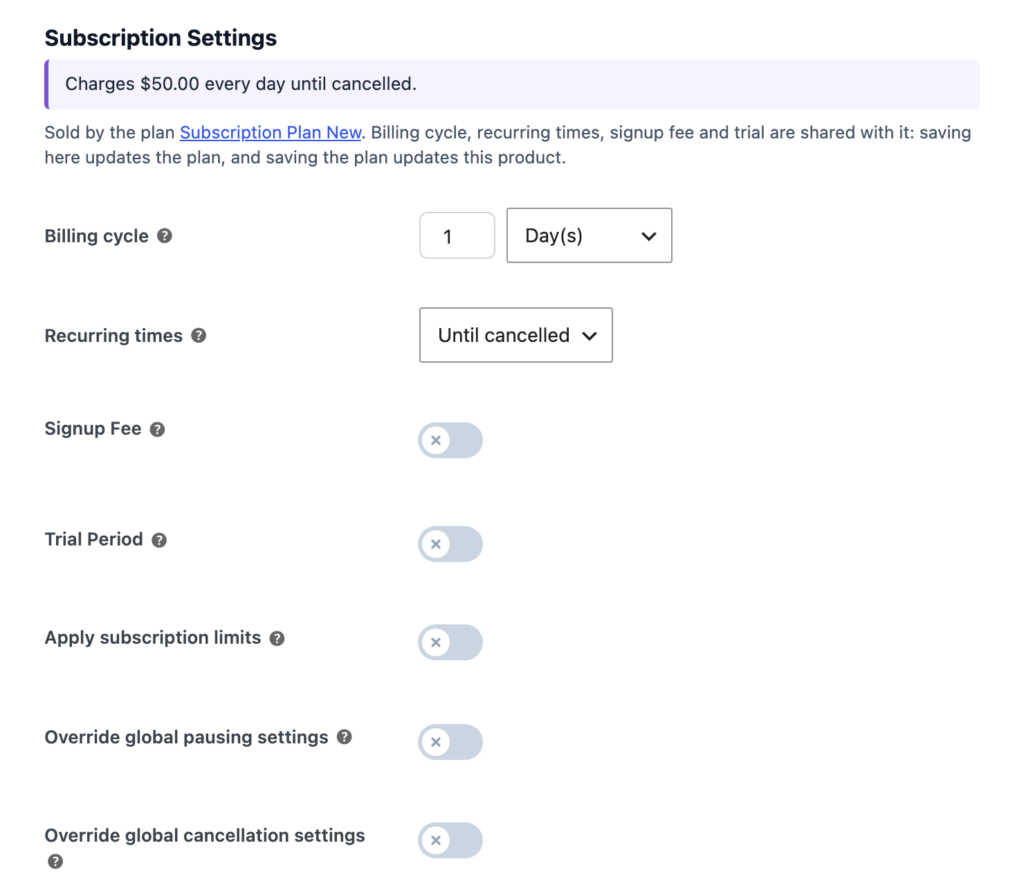
- Edit the product linked to your Subscription / Recurring plan.
- Under Product data, tick Subscription. A Subscription Settings section appears.
- Set the regular price – this is what each renewal costs.
- Choose the Billing cycle: every N days, weeks, months or years.
- Under Recurring times, choose Until cancelled or a fixed number of payments.
- Optionally add a Signup Fee and a Trial Period – see Free trials and signup fees.
- Update the product.
⭐ Pro feature: Without Pro, billing cycles of 1–7 days or 1–3 weeks are available. Monthly and yearly billing, trials and signup fees need Pro.
Optional limits on this product #
- Limit subscription – only one running subscription per customer, or only one ever.
- Override global pausing settings – how many times and for how long a customer may pause.
- Override global cancellation settings – for example, no cancelling in the first 30 days.
- Synchronize recurring payments on a fixed day – see Renewal synchronization.


