
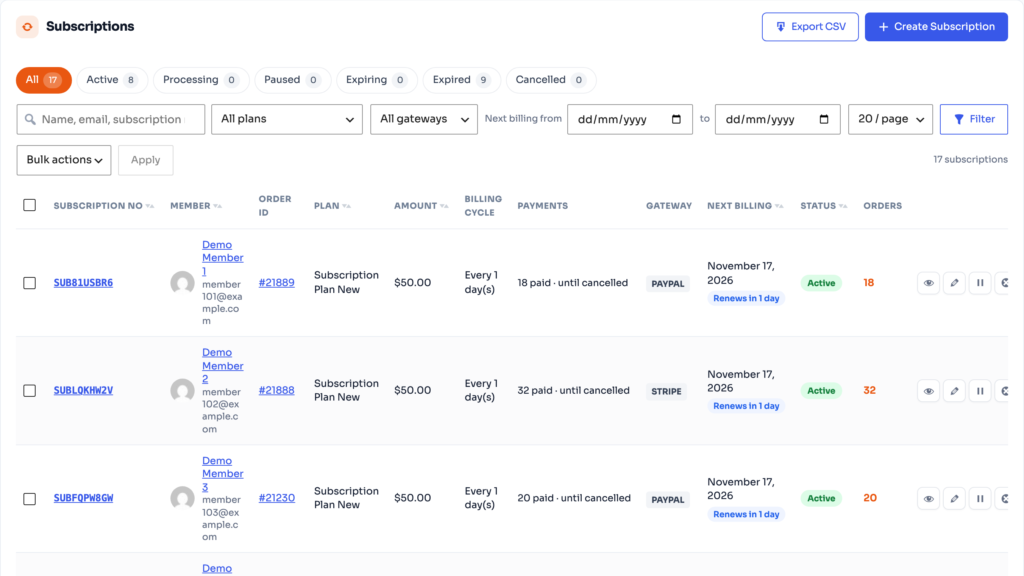
Go to MemberSutra → Subscriptions → All Subscriptions. Each row shows the subscription number, member, order, amount, billing cycle, number of payments, gateway, next billing date and status. The cards at the top show active and paused subscriptions, monthly recurring revenue, failed payments and renewals due in 7 days.
Change a subscription #
Open a subscription to see its orders and activity, then pause, resume or cancel it, or change the next payment date. Changes are sent to Stripe, PayPal or Razorpay when the gateway bills the subscription.
Subscription Activities #
The Subscription Activities tab is a log of every renewal, payment, failure, pause and cancellation – the first place to look when a customer asks “why was I charged?”.
⭐ Pro feature: Bulk actions and creating subscriptions by hand need Pro.


